
От халепа... Ця сторінка ще не має українського перекладу, але ми вже над цим працюємо!

Building the Yakaboo mobile reader with Flutter: Readium, book encryption, and offline-first

Andriy Havryliak
/
Flutter Developer
•
16 min read
Share:


Share:
•
16 min read
By Andriy Havryliak, Flutter Developer at NERDZ LAB
Published: August 2026
A production story: how the mobile app of Ukraine’s largest book platform works under the hood — from a cache-first architecture with no “offline mode” switch at all, to a layered content protection scheme built on encryption at rest and a time-boxed offline licence, and the bugs you only catch on real devices.
In this article:
- The brief: an offline-capable reading app for Ukraine’s largest book platform
- Why we chose Readium for the Flutter reader — and why we forked it
- Off-the-shelf options and why they did not survive contact with the requirements
- Why Flutter — and what it actually cost
- Offline-first architecture in Flutter: cache-first streams, not connectivity checks
- How the Yakaboo reader protects books: encryption, keychain keys, offline licences
- The reader: pitfalls the documentation never mentions
- Highlights, notes and progress: syncing without a connection
- What happens when two devices disagree
- Flutter reader development: 8 gotchas checklist
- Takeaways: what worked, and what we would change
- What we would do differently
- FAQ
The brief: an offline-capable reading app for Ukraine’s largest book platform
Yakaboo’s mobile app is a Flutter e-book reader in which offline is not a feature you switch on. There is no connectivity check anywhere in the code: every repository read serves cached data first, then goes to the network. A downloaded book opens on the metro exactly as it does on Wi-Fi. Paid content is encrypted at rest and gated by a licence that must be re-verified every 30 days.
Yakaboo is the largest online bookstore in Ukraine: over 1,000,000 titles in 71 languages, more than 3 million customers, and the only book retailer in Forbes Ukraine’s top-30 ranking of Ukrainian e-commerce. The app is not just a storefront. It is a full-featured reader covering e-books (EPUB), PDFs and audiobooks, with in-app purchases, a subscription and the user’s own libraries, all from a single codebase for Android and iOS. It has passed 500,000 installs on Google Play, and its digital catalogue runs to more than 74,000 e-books and audiobooks.
NERDZ LAB has been building and maintaining the app since 2025.
One of the key requirements from day one: the app must work offline. A person buys a book, gets on a train or the metro with no signal, and reads. At the same time, books are paid content, so “just drop the EPUB into the file system” was not an option: the content has to be protected.
The app already had a substantial user base, so every decision below had to be introduced into a live product without disrupting the libraries people already had on their phones: an upgrade path, not a rewrite.
Scope: This article covers the EPUB reader, the offline data layer and content protection. The PDF and audiobook pipelines have their own set of problems and deserve a separate write-up.

Why we chose Readium for the Flutter reader — and why we forked it
When we started building the reader, the task sounded simple: “open an EPUB and render it nicely.” In practice, the Flutter ecosystem turned out to have no full-featured reading engine:
- simple EPUB plugins from pub.dev render text as best-effort HTML: no proper pagination, no font or theme control, no stable positions within the text;
- writing EPUB rendering from scratch means months of work on CSS/XHTML layout edge cases alone;
- we needed things no plugin offers: a reading limit for free previews, coloured highlights, and page counting.
We settled on Readium, the de facto industry standard for reading apps, with native toolkits in Kotlin and Swift and a Flutter wrapper. Out of the box it did not cover our requirements, so we made our own fork and keep extending it. Three additions matter most:
- purchase state was pushed down into the native layer. The free preview is capped at 5% of the book inside the renderer itself, not at the Flutter UI level, so the cap cannot be bypassed by driving the UI, and the same limit applies to in-book search;
- callbacks for integration with our own UI;
- detection of Android WebView errors, the subtlest platform behaviour we had to design around. More on that below.
The 5% is a client-side constant, identical for every title. Giving publishers different-sized fragments would mean moving the limit into the API.
Trade-off: A fork is your responsibility forever. Every upstream Readium update now gets merged by hand. In return, we are not blocked by someone else’s roadmap: when production is on fire, we fix it in the fork within a day.
Off-the-shelf options and why they did not survive contact with the requirements
| Option | Why it did not work | What we did instead |
|---|---|---|
| pub.dev EPUB plugins | Best-effort HTML rendering: no pagination, no stable text positions, no theme control | Forked Readium and kept its native rendering engine |
| Readium out of the box | No preview cap, no page numbering, no hooks for our UI | Pushed purchase state into the native layer; added callbacks |
| EPUB renderer from scratch | Months of work on CSS/XHTML edge cases before the first feature | Not attempted |
Why Flutter — and what it actually cost
The split ended up roughly 90% Dart to 10% native. That surprises people who assume a reading app must be native-heavy, but the reader is only one part of the product: the catalogue, libraries, purchase and subscription flows, search, highlights, notes and the sync layer are all Flutter, and all written once. The native 10% is concentrated where it has to be — the Readium rendering toolkit, and the platform-specific work described below.
Would we choose Flutter again for this? Yes. Ten per cent native is a small price for building the other ninety once, and the parts that had to be written twice would have had to be written twice in any case.

Offline-first architecture in Flutter: cache-first streams, not connectivity checks
The most important architectural decision: there is no connectivity check in the app at all. No connectivity_plus, no pings. Offline is not a separate mode — it is a natural consequence of how every request works.
Every GET in a repository returns not a Future but a Stream, which:
- instantly yields the cache, if there is one, so the UI renders immediately;
- goes to the network;
- emits a second time only if the data has actually changed (compared by MD5 hash).
// library_repository.dart — a typical cache-first flow

final cached = await _responseStorage.getResponse(cacheKey);

if (cached != null && items.isNotEmpty) {
  cacheYielded = true;
  yield items;
}

// ... network request ...

final isNew = await _responseStorage.saveAndCompare(cacheKey, data);

if (!isNew && cacheYielded) return;
// no second emit — no wasted rebuild

yield parseLibraries(data);
If the network fails after the cache has already been served, the error is swallowed: the user sees data that was current as of the last connection. An error is thrown only when there was nothing to show.
In plain terms: Instead of asking “am I online?” and branching, the app always shows whatever it already has, then quietly replaces it if the server sends something different. Being offline is not an error state — it is just the case where the second update never arrives.
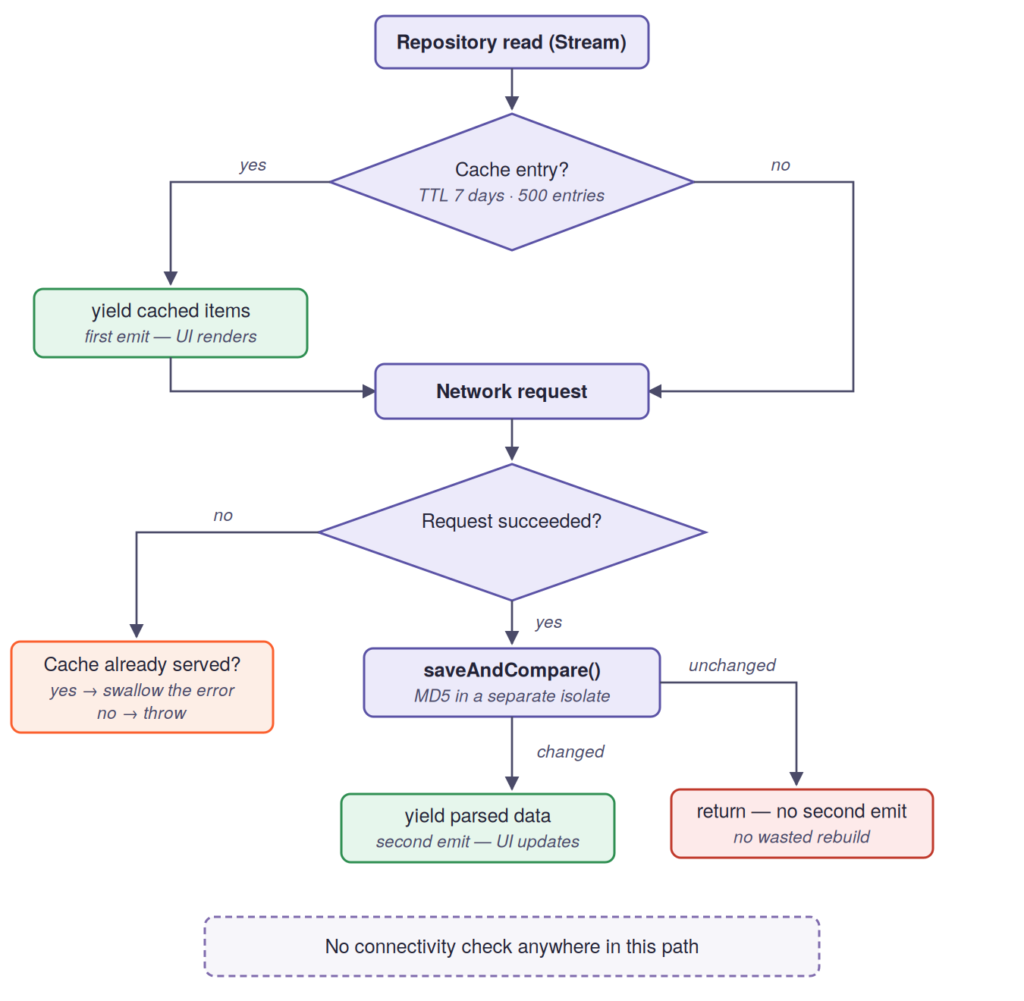
Figure 1. A single repository read. The cache is served first, the network second, and the MD5 comparison decides whether the UI ever rebuilds. Nothing in this path asks whether the device is online.
The cache layer is our own LocalResponseStorage on top of Hive:
- TTL of 7 days, a limit of 500 entries, oldest-first eviction;
- response hashing runs in a separate isolate via compute(), because MD5-ing large JSON on the UI thread means jank;
- an in-memory freshness window of 2 minutes, so one screen does not hammer the same endpoint in a loop;
- a custom _AsyncLock mutex on writes: parallel cache warm-up at startup can drive Hive into contention, so writes are serialised. Worth designing in from the start, because this race only appears on real devices under real startup load.
Gotcha: We started with an off-the-shelf HTTP cache (dio_cache_interceptor + http_cache_file_store), but it caches by HTTP semantics such as headers and ETag, while we needed “show the old data while the new is loading, and do not re-render if nothing changed.” A stock interceptor cannot express that, so we wrote our own layer.
What actually works offline:
- every previously opened screen: catalogue, libraries, book details;
- reading and listening to downloaded books;
- creating highlights, notes and bookmarks (through a queue, see below);
- reading progress tracking.
How the Yakaboo reader protects books: encryption, keychain keys, offline licences
Storing and protecting books is a three-part scheme: encryption at rest + keys in the system keychain + an offline licence with an expiry date.
What the protection layer is designed to do
Three properties drove the design. A book file taken off the device should be useless on its own, which is what encryption at rest plus a key held in the platform keychain gives you. Book content should not be capturable as a stream of screenshots, which is what the secure display layer handles. And access should be verifiable: a device may read offline, but only inside a window the backend controls, which is what the 30-day licence sets. Everything in this section follows from those three.
The life cycle of a book
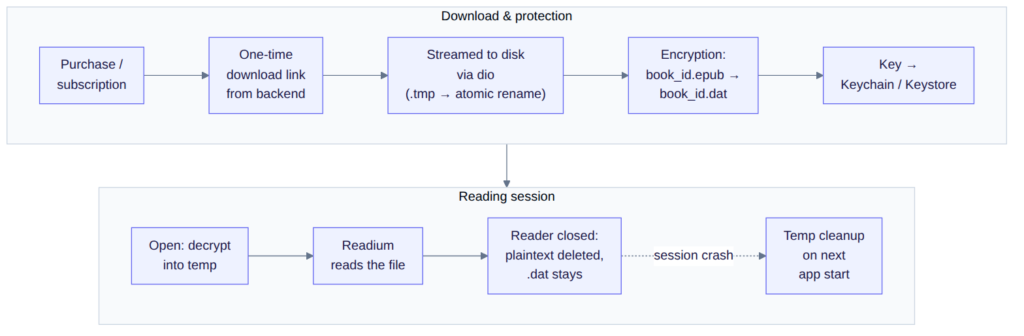
Figure 2. The pipeline: purchase → one-time link → streamed download with an atomic rename → encryption → key in the keychain → decryption into temp on open → reading → cleanup. If the app crashes mid-session, the plaintext is swept on the next launch.
Downloads are streamed and atomic. The file is streamed by dio straight to disk, written to {path}.tmp, and only after success renamed to its final name. No half-downloaded books on disk, ever. Streaming matters most at the top of the size range: a large PDF read whole would occupy as much RAM as it does disk, while the streamed path keeps memory flat at roughly 8 KB no matter how big the file is.
Encryption. Right after download, the EPUB is encrypted with the file_encrypter package (native AES) into a book_{id}.dat file. The key is generated by the encrypter itself and stored in flutter_secure_storage: the Keychain on iOS, the Keystore on Android, with a separate key per book.
final secretKey = await FileEncrypter.encrypt(
  inFileName: plainPath,
  outFileName: encPath,
);

await storage.write(key: secureKeyFor(bookId), value: secretKey);
On open, the .dat is decrypted into a temporary file, because Readium accepts a file path, not bytes.
Trade-off: For the duration of a reading session, the decrypted EPUB sits in the temp directory. We remove it when the reader closes, after Readium has loaded it — and, in case of a crash, on every app start, sweeping all book_*.epub files in temp during splash. Decrypting into memory would be safer, but that would mean patching Readium’s native layer on both platforms.
The offline licence: 30 days. Even a purchased book is not available offline forever.
/// Even purchased/subscription books require a re-check every
[maxOfflineAccess].
static const maxOfflineAccess = Duration(days: 30);
Next to the key in secure storage lives book_expires_{id}. The core principle, pinned down as a code comment: the absence of a record is NOT access. Access exists only if a future date is explicitly stored.
The access gate: a three-source check with a three-state result
The most interesting engineering decision here is what to do when the licence has expired and there is no internet. The naive logic “could not verify → deny” kills the main use case, offline reading. “Could not verify → allow” kills the protection. So the check returns three states.
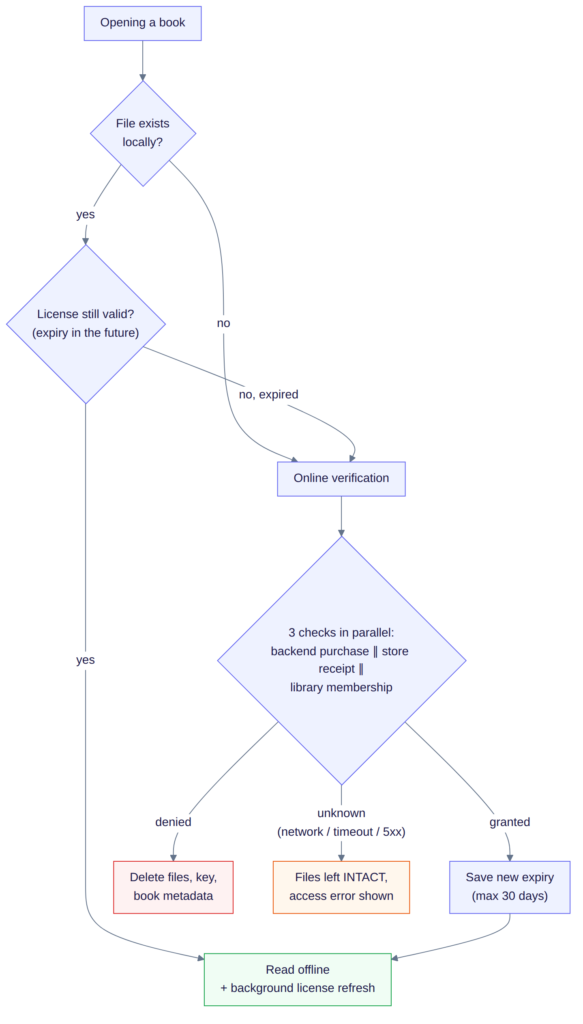
Figure 3. The decision tree when opening a book. The key fork: verification returns granted / denied / unknown, and only an explicit denied deletes the files.
Files are deleted only on an explicit denied from the backend. Any failure, whether offline, timeout or a 500, is unknown: we do not allow reading, but we do not wipe anything either, because the next successful check will restore everything.
Three sources of truth are checked in parallel: the purchase on the backend, the store receipt, and library membership. That last one is an access entitlement granted to the account — not to be confused with the user’s personal shelves from the intro.
A few more measures in the same vein:
- the reader is wrapped in a SecureScreenWidget (secure_display), so screenshots and screen recording of book content are blocked with a blur;
- on logout, wipeAllSecureStorage() deletes all enc_key_* and book_expires_* entries, so no trace of the previous user’s books remains;
- on a jailbroken or rooted device, local data is wiped and the app is blocked with a stub screen;
- existing libraries are upgraded in place: on launch, any book still in an earlier storage format is moved into the encrypted one and the previous file removed, so users gain the protection layer without re-downloading anything.

The reader: pitfalls the documentation never mentions
The reader is the part of the app where almost every problem looks the same from the outside — “the book won’t open” or “something flashed” — while the causes are completely different. Here are the ones we hit in production.
The Android WebView that dies silently
On Android, the book is rendered in a system WebView, and sometimes the OS simply kills its process to free memory. No error, no crash, no notification of any kind: the user turns a page and stares at a white screen.
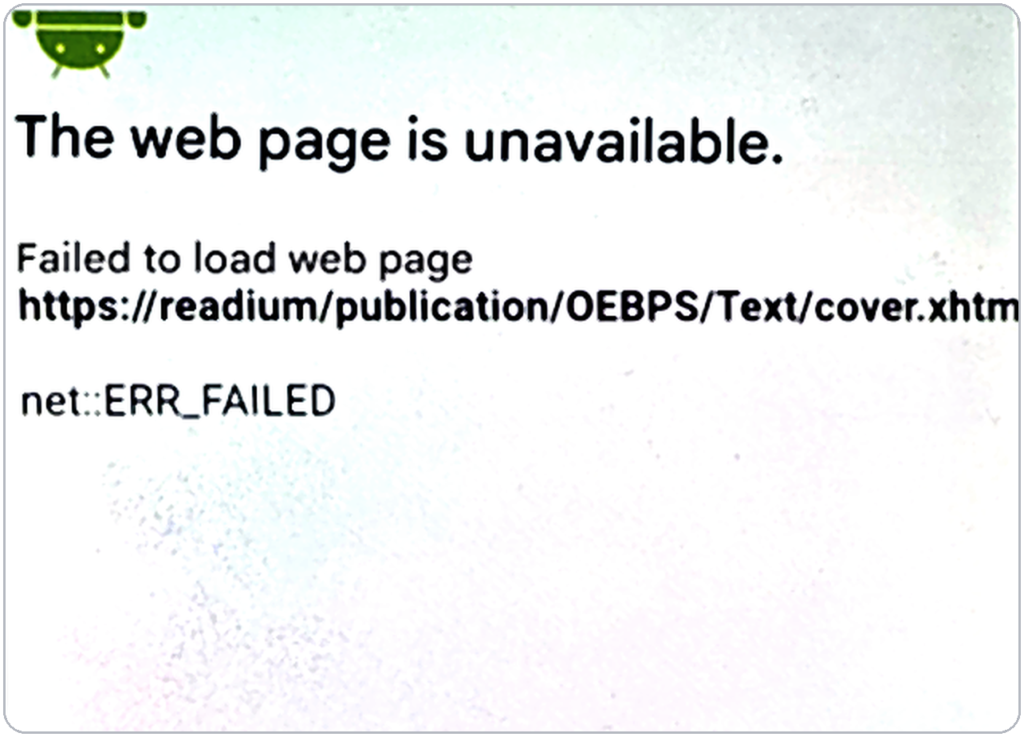
Figure 4. Android’s own error page for a reclaimed WebView process. No exception reaches Flutter, which is why the reader detects this state and rebuilds the screen itself.
How often does it happen? Clean numbers do not exist, because the recovery is silent. What we can say from living with it: it is rare, device-dependent, and driven by the OS’s own memory pressure rather than by anything in the publication. One pattern did emerge. It usually strikes when the reader has not been opened for a while, which gives Android every reason to reclaim the WebView process in the meantime.
The treacherous part: “reopen the book” does not help, because the engine gets swapped while the dead WebView stays right where it was on screen. The only reliable way out is to recreate the entire reader screen. We learned to recognise this state by a specific internal resource loading error — a request to an internal https://readium/… resource failing with net::ERR_FAILED — and to “resurrect” the reader automatically.
From the user’s point of view it looks like a brief flicker, after which the book is open at the same spot. The safeguard fires only once per session, so if a file is genuinely corrupted the app will not loop through endless “open → crash → open.”
Page turning with volume buttons: two different worlds
The feature sounds trivial: turn pages with the volume buttons. On Android it really is, because presses arrive as ordinary key events. On iOS, such events simply do not exist for the app. We had to get creative: keep the system volume away from the edges of the scale, listen to the stream of volume changes, infer which button was pressed from the direction of the change, then quietly restore the volume. This is the established workaround on iOS, and it is invisible to the user, but budget two weeks for it, not one day.
E-ink readers and hardware page turning
A separate story: Onyx Boox e-readers, which run Android on e-ink. Their hardware page-turn buttons are mapped to the volume keys at firmware level, which puts them in direct conflict with a “turn pages with volume” feature. The reader now detects these devices and leaves the volume keys to the firmware, so hardware page turning behaves natively on e-ink. E-ink devices are fewer than 5% of users — small enough to fall outside a standard device matrix, large enough to be worth explicit support. If your app touches the volume keys, put an e-ink device on the test plan.
Real page numbers: “Page 132 of 418”
Out of the box, Readium only knows “progress within a chapter,” while a person wants to see a familiar page number. We had to build our own layer on top: measure every chapter of the book, compute the total page count, and cache the result. The first full measurement runs in the background and takes about 10 seconds on an average book, faster for shorter books with fewer chapters.
The catch is that a “page” is an unstable unit. Change the font or the margins and every page has to be recounted from scratch. The cached count is therefore keyed by the full theme signature: font family, size, weight, line height and margins, so changing any one of them invalidates it.
The cache also keeps a single signature per book. Change the font and switch back, and the previous count has already been overwritten, so everything is measured again.
Theme flashing on open
Apply the reader theme at the wrong moment and a reader in dark mode sees a white flash for a split second, or vice versa. The “right moment” turned out to differ by platform: on iOS the theme must be applied before the first frame, on Android after the loader is dismissed. A small thing, but the feel of a quality reading app is made of exactly such small things.
Highlights, notes and progress: syncing without a connection
Highlights, notes and bookmarks must work offline exactly as they do online. So the app never waits for the server: a highlight appears on screen instantly, while the operation itself goes into a local queue. As soon as the connection is back, the queue ships everything it has accumulated to the server in one batch.
The queue is also smart. If you create a highlight offline and immediately change its colour, a single operation with the final data goes to the server, not two. And if you create one and then delete it right away, the server never learns that highlight existed at all: the two operations annihilate each other while still in the queue.
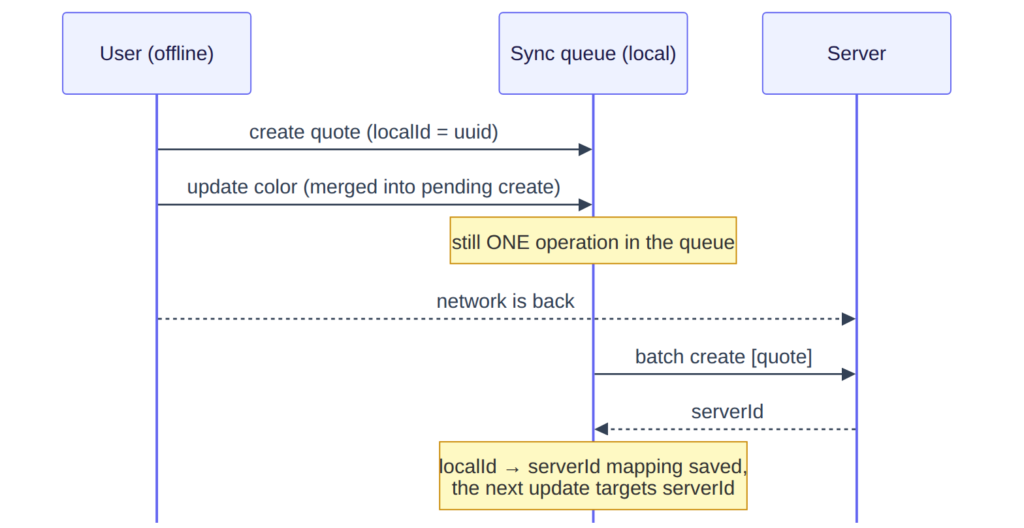
Figure 5. Creating a highlight offline: the colour change is merged into the not-yet-sent create; once the network is back, a single request goes out, and the server returns the real id.
For reading progress the rule is even simpler: never roll a person back. If the progress on the phone is ahead of the server’s, we silently keep the local one. If the person stopped further ahead on another device, we ask once: “jump there?” The same pattern works in the audio player.
What happens when two devices disagree
Progress has a safe default: the app never moves you backwards, and it moves you forward only with your consent. Highlights have no such default — the same passage can be highlighted on a phone and deleted on a tablet while both devices are offline. Here the last word always belongs to the server: on opening a book, the app takes the current list from the server and adds only the highlights you created offline that have not shipped yet, so even if a phone and a tablet did different things offline, after a sync every device shows the same state.
Changes travel to the server in batches: first all new highlights in one request, then edits, then deletions. Ordering is deliberately left to the server. The client sends the operations and the server applies them in arrival order, so the most recent write wins. Keeping clock and version logic out of the client removes a whole class of reconciliation bugs.
The queue itself lives on disk and is updated on every change, so a force-quit loses nothing: anything unsent ships a few seconds after the next launch. Its guiding principle is that a change is never lost. Delivery is at-least-once by design, so an operation interrupted mid-send is simply retried on the next launch.

Flutter reader development: 8 gotchas checklist
If you are building something similar, these are the eight that cost us the most time.
| Pitfall | Platform | What to do |
|---|---|---|
| The WebView can die silently | Android | Detect internal resource loading errors and recreate the whole reader screen, not the publication |
| Volume button presses are not exposed | iOS | Clamp the volume away from the scale edges and listen to the delta. Plan two weeks, not one day |
| Hardware page turning is mapped to volume keys | E-ink (Onyx) | Detect the manufacturer and leave the volume keys alone |
| Verification errors treated as revocation | Both | Distinguish denied from unknown. A network error is not a revoked licence, so never delete files on unknown |
| Missing local access record read as access | Both | Fail closed. Access exists only if a future expiry date is explicitly stored |
| Parallel Hive writes at startup | Both | Serialise writes with a mutex to avoid contention at warm-up |
| MD5 of large JSON on the UI thread | Both | Move hashing into an isolate via compute(), otherwise you get jank |
| Reader theme applied at the wrong moment | Both | iOS: before the first frame. Android: after the loader is dismissed |
Takeaways: what worked, and what we would change
Cache-first streams with no “offline mode” were the best decision of the project. We never once wrote if (isOffline) in feature code: offline simply works, because that is how the data layer is built.
The three-state access gate — granted / denied / unknown — is the second most valuable decision. Binary logic here would have inevitably ruined either the UX or the protection.
Forking the reader was justified, but it is a permanent tax: your own beta cycle, your own upstream merges. A more mature Flutter wrapper for Readium would have removed part of the need, though the preview cap would still have had to live in the native layer.
Our own cache layer instead of dio_cache_interceptor is not NIH syndrome: we needed the semantics of “show the old → compare → re-render only if changed,” which an HTTP cache does not provide.
What we would do differently
- Treat “decrypt into memory” as a fork task from day one. It was ruled out because Readium takes a file path, not bytes, but we were already maintaining a fork, so the real cost was scheduling the native patch rather than the patch itself. It is the one window where a plaintext EPUB exists on disk.
- Design the download path for streaming from the first line of code. Streaming to disk keeps memory flat regardless of file size, and making it the default from the start means never maintaining a second path.
- Settle the storage format before the first release. Introducing a new one into a live product means designing an in-place upgrade path and keeping it available as long as users may return from older devices. Storage decisions are the hardest to change once real users hold real data.
In one line: the most expensive bugs of a mobile reader do not live in your code. They live at the boundaries — between Flutter and the native renderer, between the cache and the network, between the platforms. Design those boundaries explicitly, and the rest of the architecture falls into place.

FAQ
Can a Flutter app read EPUB files?
Yes, but not well with off-the-shelf packages. The EPUB plugins on pub.dev render text as best-effort HTML without proper pagination, theme control or stable text positions. A production reader needs a real rendering engine: we use our own fork of Readium, whose native Kotlin and Swift toolkits sit behind a Flutter wrapper.
Is Readium available for Flutter?
Readium ships official native toolkits for Android (Kotlin) and iOS (Swift), and a Flutter wrapper exists. It does not cover everything a commercial reader needs out of the box: free-preview caps, page numbering and UI callbacks all required changes, which is why we maintain our own fork.
How do you protect e-books in a mobile reader app?
Three layers working together: AES encryption at rest, so the file on disk is unreadable on its own; one encryption key per book held in the iOS Keychain or Android Keystore; and an offline licence that expires after 30 days and must be re-verified against the backend before reading continues. A secure display layer blocks screenshots and screen recording of book content.
How do you make a Flutter app work fully offline?
By not building an offline mode at all. Every repository read returns a Stream that yields cached data first, then goes to the network and re-emits only if the response has changed. With no connectivity check anywhere, being offline is simply the case where the second emission never arrives and the user carries on reading cached data.
Why does an Android WebView go blank in a reader app?
The OS can reclaim the WebView process to free memory without raising an error or a crash. Reopening the book does not help, because the reclaimed WebView stays on screen. The fix is to detect the internal resource loading error and recreate the entire reader screen.
Working on something similar?
NERDZ LAB builds mobile products where the hard part is below the UI: offline data layers, content protection, native integrations. If you are planning a reader, a media app or anything that has to work without a connection, tell us about the project or browse our case studies and mobile app development services.
Get more insights:
See all



Ostap Marchenko
/
iOS Developer
mobile
— 5 min read