
От халепа... Ця сторінка ще не має українського перекладу, але ми вже над цим працюємо!
Shorebird in practice: what you can update in a Flutter app without the store — and what you cannot

Andriy Havryliak
/
Flutter Developer
•
18 min read
Share:


Share:
•
18 min read
We took a close look at Shorebird — a service that updates a Flutter app remotely, bypassing the app stores: what it does in practice, where the traps are, and why we think its best moment is the first weeks after a product launches.
By Andriy Havryliak – Flutter Developer at NERDZ LAB
In this article:
- In short: why we looked into code push
- How Shorebird works — and why it is not magic
- Setup: three commands and the first trap
- From the first check to a redesign: what we shipped as patches
- The second trap: an icon that would not ship
- Which packages a patch can carry — tested both ways
- What we checked by hand: delivery time and rollback
- What if a patch breaks the app?
- How to keep a patch from breaking the app
- What it costs, what the free tier includes, and who Shorebird suits
- Shorebird in a Flutter project: a checklist of 9 traps
- Conclusions: what worked — and what we would do differently
- FAQ
In short: why we looked into code push
The first days and weeks after launch are the busiest time in an app’s life. A wide audience finally opens it and finds what the team did not: an awkward step in the navigation, a label that does not fit, an edge case in the logic. Most of these fixes are small, yet each one has to clear store review and then wait for people to update.
So we wanted to look into Shorebird — a service that updates a Flutter app remotely, without going through the store. We were not interested in whether the demo works. We wanted practical answers: what exactly can ship without a release, how fast an update reaches a phone, what happens when an update goes wrong, and what it costs.
For the study we used SealsBase Center, a small app of ours. It tracks the sealing of objects — who sealed a hatch, a tank or a trailer, when, and with which seal — and is built with Flutter and Firebase. It is distributed internally and never released through the App Store or Google Play, which let us experiment without any risk to real clients. We have not yet used Shorebird on large client products — but what we saw convinced us to offer it to clients.
We looked at how to connect the service to a project with flavors, how an update reaches the phone and how much it weighs, which changes go through (UI, navigation, text, Dart packages) and which do not (native plugins, new icons and assets), and how rollback, a staging track and offline launches behave. The short answer: an update weighs from tens of kilobytes to about a megabyte and a half instead of a 100 MB APK, publishes in about a minute and appears after the app restarts.
📘 Scope: Android and iOS. Shorebird is cross-platform, and everything described here applies to both: the same commands, the same rules about what a patch can carry, the same rollback and staging track. We checked it on Android — on both emulators and real devices. On iOS only the details under the hood differ: changed functions run through an interpreter (Apple requires it), and patches are checked on a real iPhone rather than the simulator. For typical fixes — screens, text, navigation — the difference is not visible. We will describe our iOS experience separately.
🎯 Where Shorebird pays off most. In our view, in the first weeks after the first release of a small or mid-sized product. That is when an app first meets a wide audience and the most small bugs appear — and almost all of them live in Dart: an extra step in navigation, text that does not fit, an edge case in the logic, missing logs that would explain what happened. The native part is usually settled by the first release. Instead of days of review and weeks of waiting for people to update, a fix arrives in minutes — and at that volume it fits the free tier or Pro at $20.
How Shorebird works — and why it is not magic
Shorebird is code push for Flutter, built by the company of the same name, founded in 2023. It updates the Dart code of an installed app — and only that. To make it possible, Shorebird replaces the toolchain itself:
- Its own Flutter fork. The release is built not with plain
flutter buildbut with a forked engine that has an updater built in — a Rust library that checks for, downloads and installs patches. A patch will not apply to a regular build. - A patch is a diff.
shorebird patchcompares the new code with the stored release and uploads only the difference to a CDN. Hence hundreds of kilobytes instead of hundreds of megabytes. - Android and iOS: one process, slightly different mechanics. For a developer everything is the same: the same commands and the same rules. What differs is how the phone runs the update. On Android a patch is regular compiled code. On iOS Apple does not allow downloading native code, so Shorebird runs only the changed functions through an interpreter while the rest of the app runs as usual. According to Shorebird, that is about 5% of the code in a typical patch (source) — not noticeable on screens, text or navigation.
- Applied on the next launch. The updater checks for a patch in the background at startup and downloads it, but switches to it only on the next launch. The app does not restart itself.
💡 In plain words: An app is a box holding native code, images, fonts and our Dart. Shorebird can replace only the Dart. Everything else in the box stays as it was in the release — and that shapes everything else in this article.
⚖️ Trade-off. Instant updates come at the price of dependence: on a Flutter fork (Shorebird’s Dart SDK fork is closed), on their servers and CDN, and on how fast they support new Flutter versions.
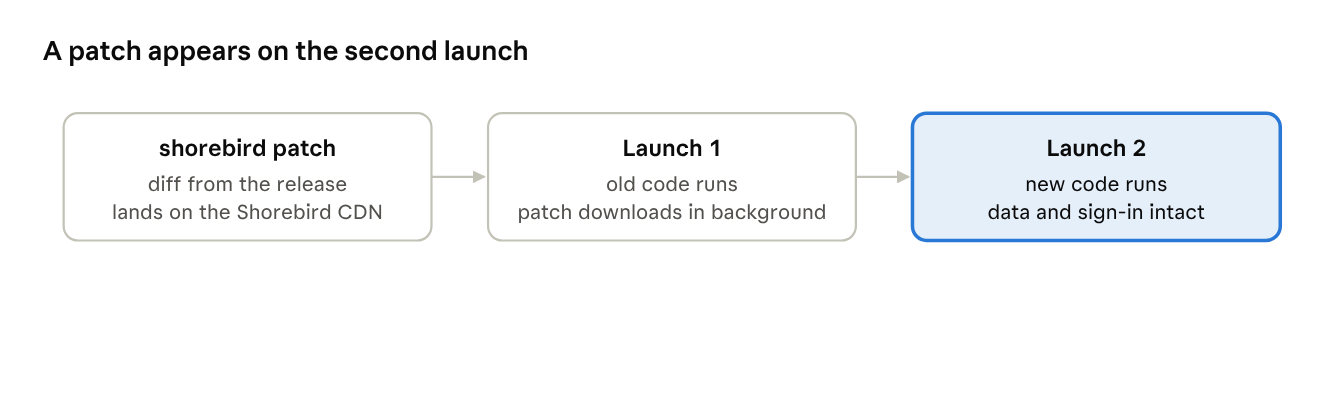
A patch’s path from the command to the screen. On the first launch the user still sees the old version — worth remembering when a fix is urgent.
Setup: three commands and the first trap
Setup itself takes three commands and touches three files in the project:
curl --proto '=https' --tlsv1.2 https://raw.githubusercontent.com
/shorebirdtech/install/main/install.sh -sSf | bash
shorebird login
shorebird init
shorebird init found our flavors on its own and created a separate app_id for dev and prod in shorebird.yaml, added that file to the assets and the INTERNET permission to the manifest. One side effect: while rewriting the asset list in pubspec.yaml, it dropped a comment of ours — minor, but look at the diff after init.
The very first shorebird release failed.
The project lived on Flutter 3.22, while Shorebird, when no version is given, takes the newest one — 3.50.1 for us. Gradle refused to build with it: Android Gradle Plugin 8.3.2 was too old for the Kotlin plugin, which needs at least 8.5.2. Worse, by that point the new Flutter had already run its migrator and rewritten four project files. Among other things it replaced minSdk = 23 with the default value, and 23 is the minimum for Firebase Auth.
⚠️ Gotcha. Always pass
--flutter-version. Without it you build the release with a different Flutter than you develop on, and its migrator may silently rewrite your Gradle files. Rungit diffafter the first build.
The fix took two steps. The minimum Flutter for a Shorebird release is 3.24, so we took the supported version closest to our 3.22, 3.24.5, and pinned it for the project with FVM:
fvm use 3.24.5
shorebird release android --flavor prod --target lib/
main_prod.dart --flutter-version=3.24.5
On 3.24.5 the Gradle files stayed untouched. And FVM gave us what had been missing: local development runs on the same version as the release, while other projects on the machine keep theirs.
⚖️ Trade-off. The Flutter version of a release is the version of all its patches. You cannot upgrade Flutter through a patch, and that also limits your choice of packages: the latest
package_info_plus9.x does not even build on our 3.24.5.
From the first check to a redesign: what we shipped as patches
For the first check we added a simple, visible UI element — so we could tell at a glance that the app had updated. After that we shipped real changes, all on the same release 0.1.0+1 and without a single reinstall:
| Patch | What changed | Size (arm64) |
|---|---|---|
| 5 | A new Dart package, timeago: “20 minutes ago” on object cards | 1.37 MB |
| 4 | The “Directories” tab moved from the bottom bar into the profile | 1.34 MB |
| 3 | A new bottom bar with the scanner in the middle | 1.32 MB |
| 2 | “Questions and answers” and “About us” pages | 1.34 MB |
| 1 | A test UI element to see the update arrive | 405 KB |
A navigation redesign — entirely through patches
The clearest example is the rebuilt bottom bar. It used to have five tabs, with the scan button floating as a separate round element in the bottom-right corner, over the content. We made two changes, and both reached the phone as patches, without the store:
- The scanner moves to the centre of the bar (patch 3). The button became a raised square in the middle of the bar, right where the thumb rests. The “Seals” tab got a lock instead of a QR icon so it would not blend with the scanner — and this is exactly where we hit the icon trap described below.
- “Directories” moves into the profile, for symmetry (patch 4). Five tabs plus a centred button did not fit symmetrically. So the tab opened least often — the directories, which are really settings — moved into the profile, under a new “Management” section. Every role now has exactly four tabs: two on each side of the scanner.
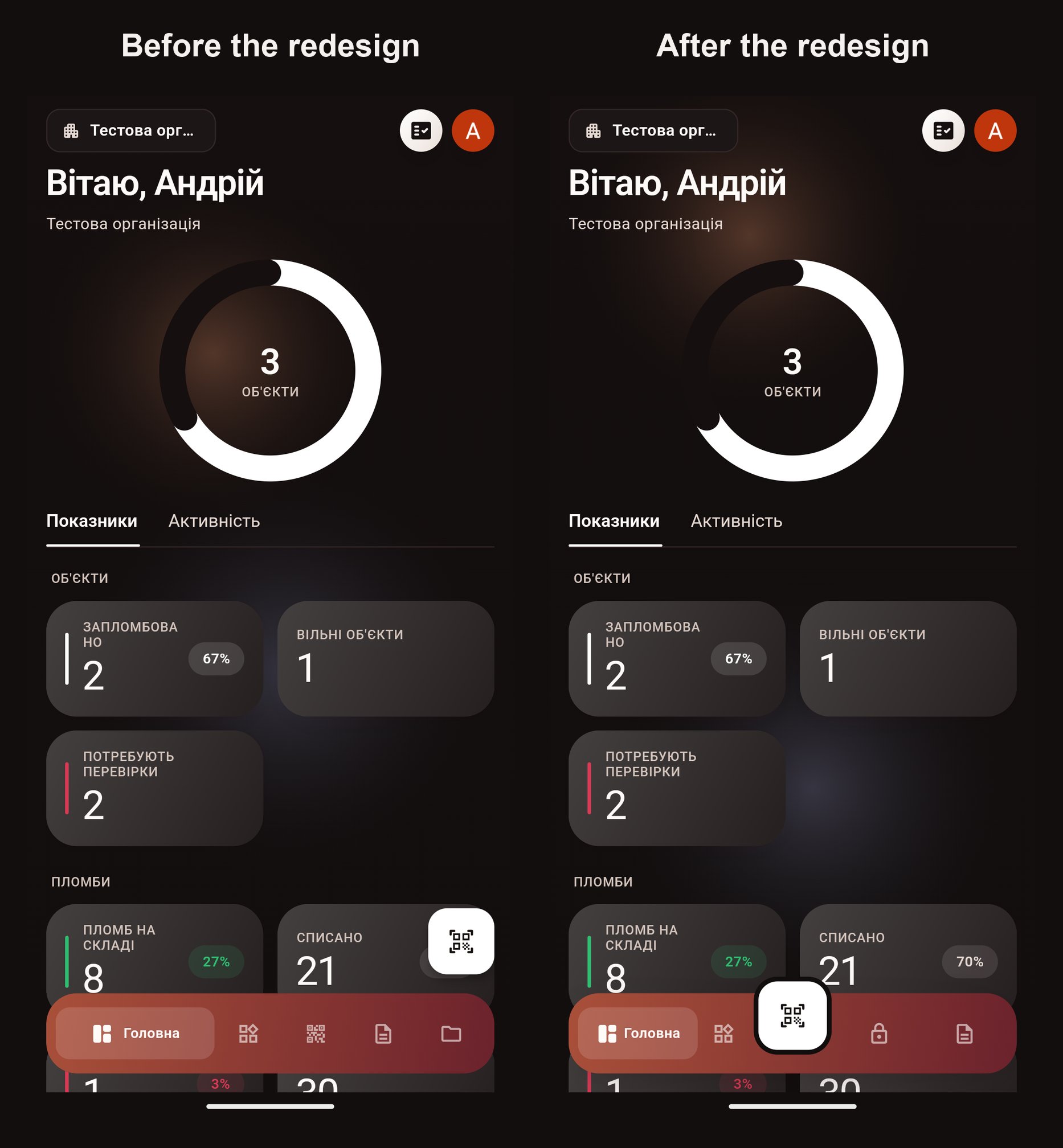
On the left, the bar before the redesign: five tabs and a separate scan button in the corner. On the right, after: the scanner in the middle, four tabs in symmetry, “Directories” moved into the profile. All of it reached users as two patches of about 1.3 MB each — no new APK and no review.
Patch 2 is no longer a hotfix but a feature: two new screens, 18 questions with answers and 65 new strings. The strings live in an .arb file but are generated into Dart classes, so they ship in a patch together with the code. A new patch replaces the previous one entirely: after patch 2, the test element from the first one disappeared on its own.
💡 In plain words: Patches do not stack. Each one is the full new state of the Dart code relative to the release, so a phone that missed patches 2–4 only needs to download the fifth.
The second trap: an icon that would not ship
The first attempt at patch 3 was refused. We had swapped the icon of the “Seals” tab for another Material icon, and Shorebird replied:
Not publishing: assets changed since the release,
and a patch can't include those changes.
base/assets/flutter_assets/fonts/MaterialIcons-Regular.otf
The cause is tree shaking. Flutter does not bundle the whole 1.6 MB Material Icons font; it cuts out only the glyphs the code uses (20 KB in our case). A new icon in the code means a new font file, and a patch cannot deliver files. Had we bypassed the check with a flag, phones would have shown an empty box instead of the icon.
The way out was simple: we used a lock icon that was already in the release on the cards of sealed objects. And before every patch since, we compare the icons in the code with those in the release in one command:
comm -13 \
  <(git grep -ohE 'Icons\.[a-z_0-9]+' <release-commit>
-- lib | sed 's/^[^:]*://' | sort -u) \
  <(grep -rohE 'Icons\.[a-z_0-9]+' lib | sort -u)
⚠️ Gotcha. A new Material icon is an asset change, not a code change. A patch can only use icons the app already used at release time.
Which packages a patch can carry — tested both ways
The rule is short: a patch can carry any pure-Dart package. A package with native code, or with its own fonts or images, needs a new release. We did not take that on faith and tested both cases on our release.
Test 1: timeago, pure Dart. We added the package so object cards would read “20 minutes ago” instead of a time. Only the package itself appeared in pubspec.lock. shorebird patch --dry-run answered “No issues detected”, and we published it as a real patch of 1.37 MB.
Test 2: package_info_plus, a plugin. One line in pubspec.yaml — and Shorebird refused:
Your app contains native changes, which cannot be applied with a patch.
Changed files:
  base/dex/classes.dex
Breaking differences (11855)
One small plugin rebuilt all of the app’s compiled Java/Kotlin code: 11,855 differences in classes.dex. On top of that, the latest 9.x version did not even build on our Flutter 3.24.5 — we had to use 8.x.
SealsBase Center has 26 direct dependencies, and 12 native plugins end up in the build, counting transitive ones: Firebase, Google Sign-In, the scanner, the camera, printing, secure storage and a local database. They are already in the release, so patches can use them freely. Here is what the boundary looks like in practice:
| Ships in a patch | What for | Needs a release | What for |
|---|---|---|---|
signature | a finger signature on an act | firebase_messaging | push notifications about assigned checks |
qr_flutter | a seal’s QR code on screen | geolocator | GPS in every operation |
fl_chart | charts on the home screen | nfc_manager | NFC seals |
excel, csv | Excel reports | firebase_crashlytics | crash reports |
timeago | “20 minutes ago” | local_auth | fingerprint sign-in |
image | photo compression | share_plus, url_launcher | sharing, calling |
flutter_animate | animations | package_info_plus | app version |
💡 In plain words: If you know you will need push notifications or GPS in a month, add the plugin to the next release now, even before the feature is ready. Then the feature itself can arrive as a patch.
⚠️ Gotcha. A harmless Dart package can pull in a new version of one of your plugins — and that is already a native change. After
pub add, look at thepubspec.lockdiff; the final answer comes fromshorebird patch --dry-run. The--allow-native-diffsand--allow-asset-diffsflags only switch the check off.
What we checked by hand: delivery time and rollback
We tested on both emulators and real Android devices. The numbers below come from individual runs, so treat them as a guide rather than a benchmark.
| Test | What we did | Result |
|---|---|---|
| Publish time | shorebird patch for patch 5 | 59 seconds from starting the command to a published patch |
| Time to screen | Published at 12:49, two restarts on the phone | Appeared after a few app restarts — within 8 minutes of publishing |
| Data after a patch | Several patches in a row | Sign-in and data intact, no reinstall |
| Dart package | timeago in patch 5 | Passed, patch published |
| Native plugin | package_info_plus, --dry-run | Refused: changes in classes.dex, 11,855 differences |
| New Material icon | An icon not present in the release | Refused: the font asset changed |
| Rollback | shorebird patches rollback for patch 5 at 12:59 | The command took 3 seconds. The phone returned to patch 4 after a few restarts, data intact. Rolling forward with shorebird patches rollforward at 13:09 also took 3 seconds, and after restarts patch 5 was back |
Publishing is fast; from there, the person holding the phone decides: a patch appears on the second cold start after publishing. An app that sits in the phone’s memory for weeks will get the fix later.
We moved the riskier tests to a dev build on an emulator: a separate app in the Shorebird console, its own release and zero users. The smallest patch — one period added to a line of text — weighed 10.75 KB, thousands of times smaller than the APK. We also timed cold starts with and without a patch and saw no difference on Android.
Staging. We published dev patch 2 with --track=staging (19 KB). The emulator, on the regular stable track, stayed on patch 1 through three restarts. After shorebird patches promote, patch 2 arrived within three restarts. So a patch can sit safely on a test track without users seeing it.
No internet. We turned off Wi-Fi and mobile data. The app started in 819–925 ms on the patch it already had. The updater simply writes to the log and moves on:
[shorebird] Update failed: Patch check request failed
due to network error.
[shorebird] Reporting successful launch.
What if a patch breaks the app?
The biggest fear with code push is shipping an update that breaks the app for everyone. We tested three variants on purpose on a dev build: published the patch, waited for it to take effect on the phone, and then rolled it back.
| Scenario | What happened to the app | Did the rollback save it? |
|---|---|---|
Closes in its very first second (exit(1) at the top of main) | Closes on every launch | No: the app dies before the server’s answer arrives |
An error on start (throw in main) | The process is alive, but the app hangs on the splash screen | Yes: it received the rollback on the first launch and worked again on the second |
| Crashes 5 seconds after start | Manages to open, then closes | Yes: it received the rollback on the first launch and worked again on the second |
Why this happens. Shorebird checks for updates in the background on every launch, and the server answers within seconds. As long as the app stays alive that long, it learns about the rollback and returns to the previous version on the next launch. If a patch kills the app instantly, the answer never arrives — and the rollback never reaches that phone.
Shorebird’s automatic protection did not kick in in any of the three cases. To it, every launch was successful (“Reporting successful launch”): the engine loaded the patch and started the code, and it was our own code that failed. The automation guards against a patch that fails to load; against a bug in your logic, the manual rollback is what saves you.
⚠️ Gotcha. The most dangerous patch is one that takes the app down in its very first second: a rollback cannot fix it. So every patch goes to staging first and is launched on a test phone, and only then is it promoted to
stable. For client products this is not advice, it is a rule.
💡 A side observation: When we first made the
throwunconditional, Shorebird refused to publish the patch: the compiler dropped the “dead” code after the error, and with it some of the icons, so the font asset changed. Even a change in logic can touch assets —--dry-runwill show it in advance.
⚠️ Gotcha. Like a patch, a rollback reaches phones through restarts, not instantly: after the first restart our phone still showed the rolled-back patch.
How to keep a patch from breaking the app
The takeaway from these tests is simple: a rollback is insurance, not a plan. A broken patch has to be stopped before it reaches users. These are the rules we follow now:
--dry-runfirst. Before publishing, it shows whether native code or assets have changed.- Then staging and a test phone. The patch goes to the test track, and you launch the app a few times on a real device — with a release build, not a debug one.
- No rush to
stable. Afterpromote, start with--rollout 10, and only when all is quiet open it to everyone. If something goes wrong, it hits a tenth of your users, not all of them. - Do not touch startup through a patch. The code that runs in the first seconds (
main, initialisation, the launch screen) is exactly the code whose breakage a rollback cannot fix. Ship changes there as a new release. - Catch errors instead of crashing. Wrapping startup in
runZonedGuardedwith an error handler keeps the app alive long enough for a rollback to arrive. And noexit()in your code at all. - See the problem before your users do. Crash reports (Crashlytics, for example) surface a bad patch within minutes. It is a native plugin, so it has to be in the release ahead of time.
- Know what to roll back. A git tag on every patch and a patch log let you see within a minute which patch is at fault and roll back exactly that one.
Follow these rules and a broken patch gets stuck on a test phone or in a tenth of your users — and the rollback stays insurance you never need to use.
What it costs, what the free tier includes, and who Shorebird suits
Shorebird does not bill for patches or for users but for patch installs: one device downloading one patch is one install. All our experiments on a single phone fit into a handful of installs out of 5,000 free per month.
Pricing changes on December 14, 2026 (announcement), while the pricing page still shows the old plans. Here are the new ones, per the announcement:
| Plan | Price | Patch installs per month | Over the limit | Apps | Team |
|---|---|---|---|---|---|
| Hobby | free | 5,000 | none | 5 | owner only |
| Pro | $20/mo or $200/yr | 25,000 | $0.002 per install | 50 | 5 people |
| Business | $400/mo or $4,000/yr | 500,000 | $0.002 per install | 200 | 25 people |
| Enterprise | custom | — | — | — | — |
Compared with the old plans, the Pro and Business quotas were halved (from 50,000 and 1,000,000), and the overage price rose fivefold: it used to be $1 per 2,500 installs. Existing customers keep their old quotas.
In every plan, including the free one: patch rollback, signed patches (on by default since October 26, 2026), a staging track, percentage rollouts, console analytics, service accounts for CI. Enterprise only: SAML and SCIM, audit logs, protected tracks with approvals, freeze windows, scheduled rollouts.
💡 In plain words: Count it as active devices × patches per month. An app on 2,000 phones with two patches a month is 4,000 installs — that fits the free Hobby plan. On 20,000 phones the same two patches make 40,000: Pro at $20 plus 15,000 over the limit at $0.002 — about $50 a month in total.
Benefits we saw first-hand
- Speed. From
shorebird patchto a published patch in 59 seconds. No store review at all. - Size. 0.4–1.4 MB instead of a 100 MB APK — it matters when people work on mobile data in the field.
- No waiting on users. The patch arrives on its own, without the store’s “Update” button that many people put off for weeks.
- Data stays put. Sign-in and app data survived every patch.
- Flavors out of the box. dev and prod are separate apps in the console, so a test patch never reaches the production app.
Who Shorebird suits — and who it does not
| Good fit | Poor fit |
|---|---|
| B2B and corporate apps, where you cannot make people update | Web apps: there an update is just a new deploy, and Shorebird does not support the web |
| Apps where a bug is expensive: accounting, finance, logistics | Apps where most changes are native plugins or assets |
| Frequent releases and hotfixes in Dart logic | Games and apps that live on images and animations in assets |
| White-label: one codebase, hundreds of branded apps | Apps whose patches often change heavy computations: on iOS changed code runs through an interpreter |
And what Apple and Google will say
The stores have made no statements about Shorebird specifically. Google Play forbids downloading executable code but makes an exception for code that runs in a virtual machine or an interpreter (policy). Apple allows interpreted code that does not change the app’s primary purpose (DPLA 3.3.1(B)), although App Review guideline 2.5.2 reads stricter. Shorebird’s position: hotfixes yes, big new features through review.
⚖️ Trade-off. Our patches 2–4 were no longer hotfixes but small features. Technically that works, but the “does not change the purpose” line is your call. A new help section is fine; a new product inside the same walls is not.

Shorebird in a Flutter project: a checklist of 9 traps
If you are adding Shorebird to an existing project, here are nine things that cost us the most time.
| Trap | Where | What to do |
|---|---|---|
| The release is built with the newest Flutter, not yours | shorebird release | Always pass --flutter-version and pin the same version with FVM |
| The new Flutter’s migrator silently rewrites Gradle | First build | Run git diff after every build on a new version |
| The project is on a Flutter older than 3.24 | Setup | Upgrade Flutter to a supported version before the first release |
shorebird init rewrites the assets in pubspec.yaml | Setup | Check the diff, restore comments |
| A new Material icon is a new font asset | Patch | Use only icons already in the release; compare the list before patching |
| A plugin or its new version changes native code | Patch | Watch the pubspec.lock diff; check with --dry-run; add plugins to the release ahead of time |
A patch without --track goes to everyone at once | Patch | Start with --track=staging or --rollout 10, then widen |
| A patch has no description | Maintenance | An annotated git tag on the patch commit and a PATCHES.md log |
| A patch that kills the app in its very first second cannot be fixed by a rollback | Patch | Every patch goes to staging and is launched on a test phone first; only then promote to stable |
Conclusions: what worked — and what we would do differently
Shorebird does what it promises. A change in Dart code publishes in a minute, weighs from tens of kilobytes to about a megabyte and a half, and reaches people without review or reinstalling. The staging track and offline launches work exactly as documented. Rollback works too — with one important exception: a patch that kills the app instantly, in its very first second, cannot be fixed by a rollback (if the app lives even a few seconds, the rollback gets through). So for client products every patch goes to staging first.
The boundary is clear and honest. A patch carries code — screens, navigation, text, logic, Dart packages. Assets and native code go only through the store. And the service guards that boundary itself: it stopped both the new icon and the native plugin before publishing, rather than letting them break the app on phones.
Most of our time went not to the technology but to the Flutter version. An old Flutter in the project, a migrator that rewrites Gradle, packages that do not build on the pinned version. Pin the version with FVM before the first release — and these problems disappear.
The best moment for Shorebird is the first release.
What we would do differently
- Add Shorebird before the first release, not after. Patches apply only to a release built with Shorebird. If the first store version was built with plain
flutter build, a patch will never reach those people. - Put plugins into the first release ahead of time. Push notifications, analytics, crash reports — even if the features are not there yet. Then the features themselves can ship as patches.
- Send patches to staging first. Our first patches went straight to
stable. On our own project that is fine; on a client project you need an extra verification step. - Keep a patch log from day one. A week later you will not remember what was in patch 3, and without that a rollback becomes guesswork.
In one line: Shorebird does not replace the store, it takes the small things off its plate — and the small things decide what an app’s first month looks like.
FAQ
What is Shorebird?
A code push service for Flutter: it updates the Dart code of an installed app without a new App Store or Google Play release. The release is built with Shorebird’s version of Flutter, which includes an updater, and changes then ship as patches weighing from tens of kilobytes.
What can a patch update, and what can it not?
It can update any Dart code: screens, navigation, text, logic, pure-Dart packages. It cannot update native code and plugins, images, fonts, new Material icons or the Flutter version. Those need a new release.
Does Shorebird work on iOS?
Yes. The commands, rules and capabilities are the same as on Android. Only the execution differs: changed functions run through an interpreter, and patches must be tested on a real iPhone. Shorebird does not support the web — there an update is simply a new deploy.
Do the App Store and Google Play allow it?
Both stores’ rules allow updating code that runs in a virtual machine or an interpreter, as long as it does not change the app’s purpose. Hotfixes and small improvements are exactly that case; big new features are better shipped through review.
How long does it take for an update to reach a user?
Publishing takes about a minute. After that it depends on the user: the app downloads the patch in the background at launch and applies it on the next launch. In our test the change appeared after a few app restarts, within 8 minutes of publishing.
What if a patch goes wrong?
You can roll it back with one command (shorebird patches rollback) or in the console, and phones return to the previous version after a restart. We checked this on a real phone. There is one exception: if a patch kills the app instantly, in its very first second, it never learns about the rollback — which is why staging comes first. After rolling back a regular patch, we brought it back with rollforward.
How much does Shorebird cost?
There is a free plan with 5,000 patch installs a month — enough for a small app. Pro costs $20 a month and, from December 14, 2026, includes 25,000 installs, then $0.002 each. Rollback, the staging track and patch signing are in every plan.
Want to try it in your product?
If you are preparing the first release of a Flutter app and want to fix bugs in minutes rather than days of review, tell us about your project. We will help you set up Shorebird so that the traps from this article pass you by.
Get more insights:
See all



Ostap Marchenko
/
iOS Developer
mobile
— 5 min read